Author Archives: Bernie

The Touch Panel feature in Bitmap2LCD

Bitmap2LCD is a tool for programming small Graphic LCDs in embedded systems.

The Touch Panel feature in Bitmap2LCD

The Touch panel / Touch Screen feature in Bitmap2LCD is to ease the

the graphical definition of the regions and to output the coordinates in the specific resolution and direction (from Origin) given by your touch panel controller.

Here’s the roadmap :
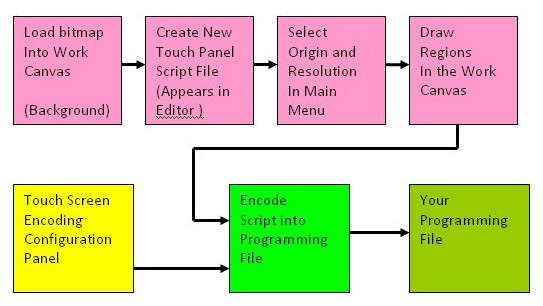
In Touch panel script Mode, the editor’s gutter becomes green

Note that the Touch Panel Script can’t be edited in the editor itself !


The Touch Panel Script is then saved as a .TSC file in the defined Touch panel Folder.

You can reopen an existing Touch Panel Script when clicking on the .TSC file name in the file explorer.
 

Convert a range of unicode chars for GLCD Font

Bitmap2LCD is a tool for programming small Graphic LCDs in embedded systems.

Convert a range of unicode chars for GLCD Font

Obsolete article, only for previous versions < V3.7

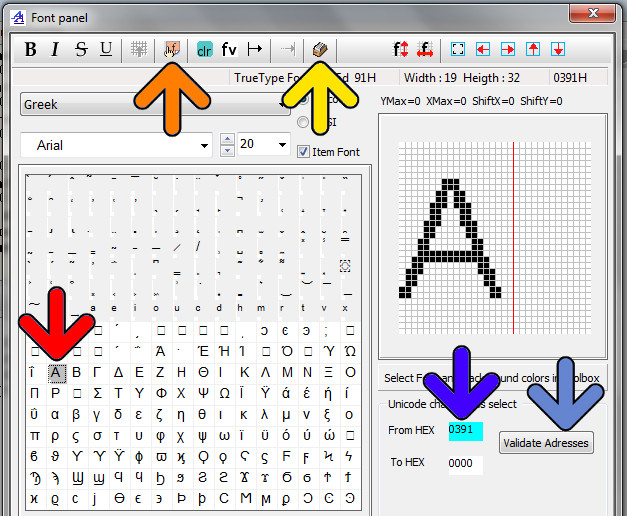
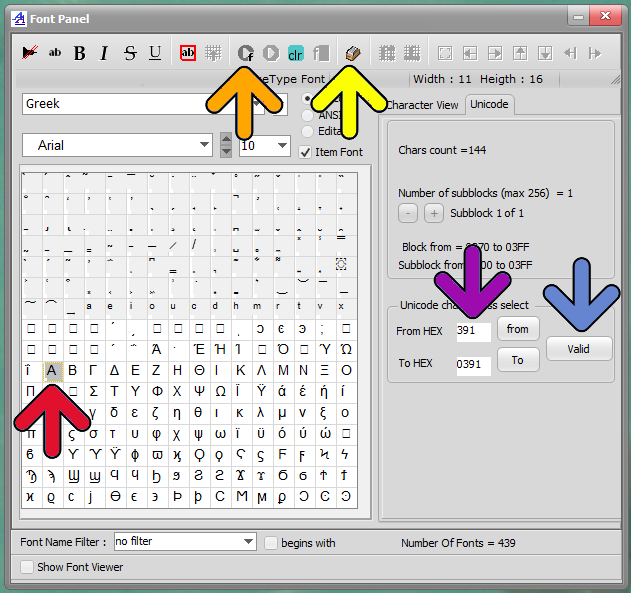
Another way to convert unicode chars by defining a range of them:

  • Enter font script mode
  • Enter Range Mode (yellow arrow)
  • If necessary, erase the from Hex and to Hex addresses with the clr button
  • Select Range Start in the char grid (red arrow), address appears in From Hex (blue Arrow)
  • Select Range End the same way in the char grid -> To Hex
  • Then Validate Address (blue arrow)
  • Encode the Font Range (orange Arrow)

Note : You can define Start and End of range addresses in different Fonts blocks. The condition is that the Start address is below the end address.

Version 3.0+

Bitmap2lcd Unicode Font Range


Before Version 3.0